Understand AI from both ethical and practical perspectives, including the specific craft of prompt engineering.
Read more

Crafting Microsoft Copilot to Unlock Learning Potential





Microsoft 365 Copilot agents are AI assistants with a specific purpose that use defined information sources and instructions to answer questions, support tasks or take actions on a user’s behalf. A member of staff can now create an agent grounded in an existing SharePoint site in a relatively short time. Establishing whether the source information is accurate, permissions are appropriate, ownership is clear and the agent is safe to share can take considerably longer.
That difference matters.
For schools and multi-academy trusts, the question is no longer simply whether staff will experiment with artificial intelligence. It is whether the organisation can turn a useful experiment into a governed, supportable and proportionate service.
The key question is not only: Can we build it?
It is also: Can we govern it as an operational service?
This article sets out five checks that schools and trusts should make before Copilot agents move beyond personal experimentation or a small proof of concept.
The objective is not to prevent staff from experimenting. It is to create boundaries within which useful experimentation can take place without leaving the organisation with unmanaged data access, unsupported services or unclear accountability.
“Copilot agent” is a broad term. The appropriate controls depend partly on how the agent is built, what information it uses, what it can do and how widely it is made available.
A simplified view includes:
These categories should not be treated as interchangeable. A small agent answering questions from approved guidance does not need the same operating model as an agent that writes information to an MIS, calls an external API or supports a critical business process.
Microsoft’s administration model also spans more than one management surface. The Microsoft 365 Agent Registry provides a central inventory of agents available to the organisation, while Power Platform administration remains important for environment-specific Copilot Studio controls, connectors and data policies.
The governing principle is therefore simple:
Base the level of control on the agent’s data, audience, capabilities and consequences, not merely on the tool used to create it.
Governance begins with visibility.
Before defining a sophisticated approval process, establish what already exists. Staff may be using agents created through different authoring experiences, in different environments and for audiences ranging from one person to the whole organisation.
A useful inventory should record:
The inventory is not, by itself, a governance process. It is the evidence base for determining which agents are low-risk experiments, which have become operational services, and which require intervention.
Microsoft’s Agent Registry can provide tenant-wide visibility into agents available to an organisation. Microsoft documents registry information including publisher, agent type, status, ownership and other governance details, although the available actions vary by agent type.
For Copilot Studio, administrators should also understand which Power Platform environments are being used. A recurring problem is that a successful experiment remains in the default environment, acquires a wider audience and gradually becomes business-critical. Governance is then applied after the service has already become difficult to move, support or withdraw.
The initial questions are straightforward:
If those questions cannot be answered, that is the first governance gap to address.
An agent grounded in Microsoft 365 information generally works within the user’s existing access to that information. It should not be assumed, however, that existing user permissions are the only relevant security boundary.
Effective access can depend on:
This is especially important when an agent moves beyond retrieving Microsoft 365 content and begins using connectors, APIs, workflows or service identities.
Copilot can make information that is already accessible easier to discover.
A member of staff may technically have access to an old Team, an inherited SharePoint permission or a document library they no longer need. That access may have attracted little attention when finding the information required navigating several sites or knowing the correct search terms. An agent can reduce that friction.
The agent has not necessarily created the underlying permission problem.
It may, however, make the consequences of that problem more visible.
Schools should therefore review whether proposed knowledge sources contain information such as:
Three questions are useful:
Technical permission is not the same as appropriate use. A person may be entitled to access a record in a particular professional context without that record automatically being an appropriate knowledge source for a widely shared agent.
An agent that presents information creates a different level of risk from one that changes a record or triggers a process.
A practical capability ladder is:
Answering: retrieving and presenting information.
Assisting: preparing a recommendation or draft for human approval.
Acting: performing a change in another system.
Automating: taking action following an event, trigger or delegated rule.
As the agent increases in complexity of capabilities and moves up this ladder, the organisation should strengthen identity controls, testing, approval, monitoring, failure handling and human oversight.
Before enabling a connector or action, ask:
Microsoft documents separate but complementary governance controls across Microsoft 365 administration and Power Platform. Copilot Studio data policies can govern agent capabilities and integrations, while the Microsoft 365 administration model governs agent availability and lifecycle at organisational level.
Written policy must be supported by technical configuration. A policy stating that only approved agents may be published is of limited value if sharing routes, maker access, connectors and deployment channels remain unmonitored or unrestricted.
Not every agent requires review by a formal governance committee, a lengthy approval process or a full development, test and production deployment pipeline. Equally, not every agent should be treated as a harmless productivity experiment.
The right approach is proportionate governance.
An agent should receive closer review when it:
These are review triggers rather than a rigid scoring formula. Several may apply to the same agent, and the combined context matters.
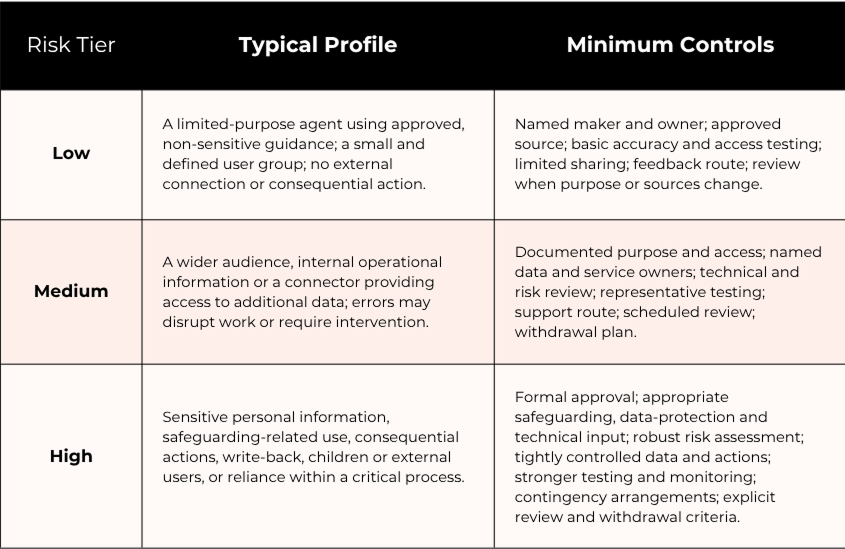
Use the highest applicable tier as the starting point, then assess the particular context.
Every operational agent should have a proportionate governance record. This might document its purpose, owner, audience, data sources, actions, approval, testing, risk classification and next review date.
That record is not automatically a Data Protection Impact Assessment.
Under UK GDPR, a DPIA is required where processing is likely to result in a high risk to people’s rights and freedoms. The ICO advises organisations to consider both the likelihood and severity of potential harm. Its guidance also identifies innovative technology, including AI, as relevant when combined with other high-risk criteria.
Schools and trusts should therefore screen the proposed processing in context, record the decision and involve their data protection officer where appropriate. The presence of AI does not remove the need for judgement, nor does it make every small agent identical from a data-protection perspective.
For schools, safeguarding is not simply another information-security category.
An agent may make welfare or safeguarding information easier to retrieve, combine or act upon. Even where the user is authorised, the organisation must decide whether the proposed use is necessary, appropriate and sufficiently controlled.
A trust-wide model can provide:
The purpose of trust-wide governance is not to force every school to deploy identical agents. It is to establish consistent boundaries and evidence requirements so that local innovation does not produce inconsistent risk decisions.
The ability to build an agent is no longer confined to specialist developers. That accessibility is valuable, but organisations must distinguish between three activities:
Creating: authoring and testing an agent within defined boundaries.
Sharing: giving specific people access to it.
Publishing or deploying: making it available through a broader organisational channel, site or catalogue.
Those terms do not have identical technical meanings across every Microsoft experience. Governance should focus on the result:
A proportionate model might allow staff to build low-risk agents using approved sources while requiring enhanced review before an agent:
This avoids two unhelpful extremes: preventing all experimentation, or treating every successful prototype as ready for production.
“Named owner” is not sufficiently precise for an operational service. Ownership usually includes several responsibilities:
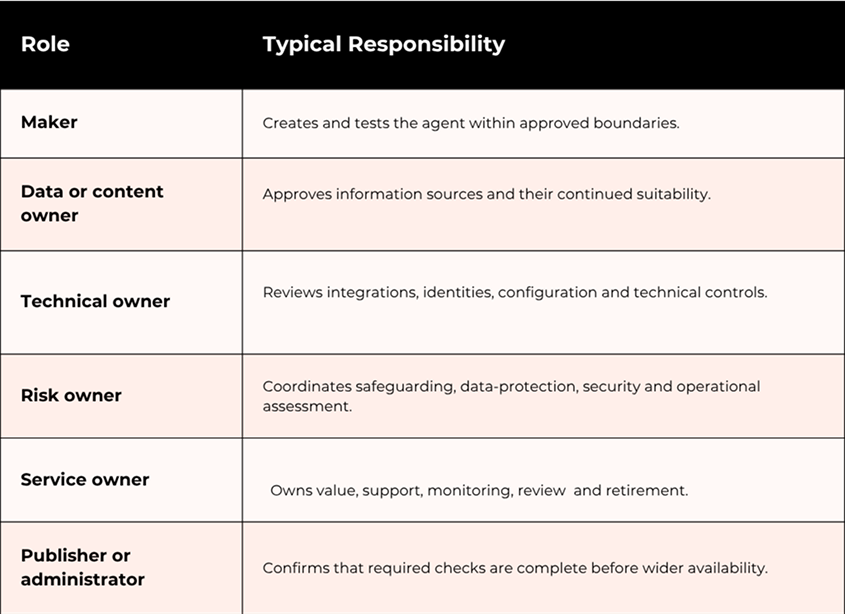
One person may fulfil several roles for a simple agent. The important point is that the responsibilities remain explicit.
Ownership must also survive organisational change. If a maker leaves, changes role or loses access, the trust should be able to identify the agent, transfer responsibility, review its dependencies and decide whether it should remain available.
Microsoft’s documented Agent Registry lifecycle capabilities include controls for visibility, access, distribution, ownership and retirement, although the exact actions available vary between agent types.
Agent Builder and SharePoint agents do not automatically require a full development, test and production environment model.
For Copilot Studio agents using connectors, actions, external systems or critical data, your Power Platform environment strategy becomes much more important. Microsoft’s governance guidance associates Copilot Studio with structured application lifecycle management and environment-level controls.
Depending on complexity and risk, supporting controls may include:
The principle is more important than a particular environment count: an experimental agent should not become a production service by accident.
Schools should decide in advance what happens if an agent gives unsafe guidance, retrieves information inappropriately or performs an incorrect action.
A practical operating process should cover:
Containment: block the agent, restrict access or disable the affected connection or action.
Reporting and triage: provide a clear route for users and identify who assesses reports.
Evidence: retain the relevant agent version, configuration, activity details and changes where available and appropriate.
Impact assessment: establish which people, records and systems may have been affected.
Escalation: involve safeguarding, data protection, security or leadership teams according to the circumstances.
Correction and retesting: fix the content, instructions, permissions or integration before access is restored.
Changes to instructions, knowledge sources, integrations, identities or actions can materially alter behaviour. Significant changes should trigger proportionate retesting and, where necessary, renewed approval.
A pilot is not simply a smaller deployment. It is a structured attempt to determine whether an agent should become an operational service.
Before beginning, define:
Without those decisions, a pilot can drift into production without anyone explicitly deciding that it is accurate enough, valuable enough or sustainable enough to support.
An agent can have technically appropriate access and still provide an incomplete, inaccurate or outdated response.
This is particularly important when an agent addresses:
Testing should include:
Where possible, users should be directed to the current authoritative source. For consequential matters, the agent should support human judgement rather than replace it.
A clear fallback is essential. If the agent cannot produce a reliable answer, it should say so and direct the user to the appropriate person, policy or process.
Usage alone does not establish value.
A school may see frequent use because an agent is helpful, because the underlying process is inefficient, or because users repeatedly ask questions that the agent fails to answer properly.
A balanced review should consider:
This last question matters. Not every information problem needs an agent. Sometimes better navigation, clearer content, a standard form or an improved business process will provide a more reliable and economical outcome.
Schools and trusts do not need to begin with a complex bureaucracy. A concise record can provide a strong starting point.
For a low-risk agent, this may fit on one page. A high-risk agent will require more supporting evidence. Proportionality should affect the depth of the assessment, not whether accountability exists at all.
Copilot agents can help schools and trusts make organisational knowledge easier to use, support routine work and improve access to approved guidance. But ease of creation should not be mistaken for operational readiness.
The most sustainable approach is neither unrestricted experimentation nor a blanket prohibition. It is controlled enablement:
If your school or trust is beginning to explore Copilot agents, start with three practical actions:
The organisations most likely to achieve sustainable value will be those that make experimentation visible, ownership explicit and governance proportionate from the beginning.
A structured Microsoft 365 and AI-readiness review can help identify permission, information-governance, Power Platform, ownership and operational gaps before an experimental agent becomes an unsupported business service.
Want to find out more?
Editorial note: Microsoft product names, agent capabilities, licensing and administrative controls change regularly. Please validate implementation decisions against current Microsoft documentation. Last reviewed: October 2026.
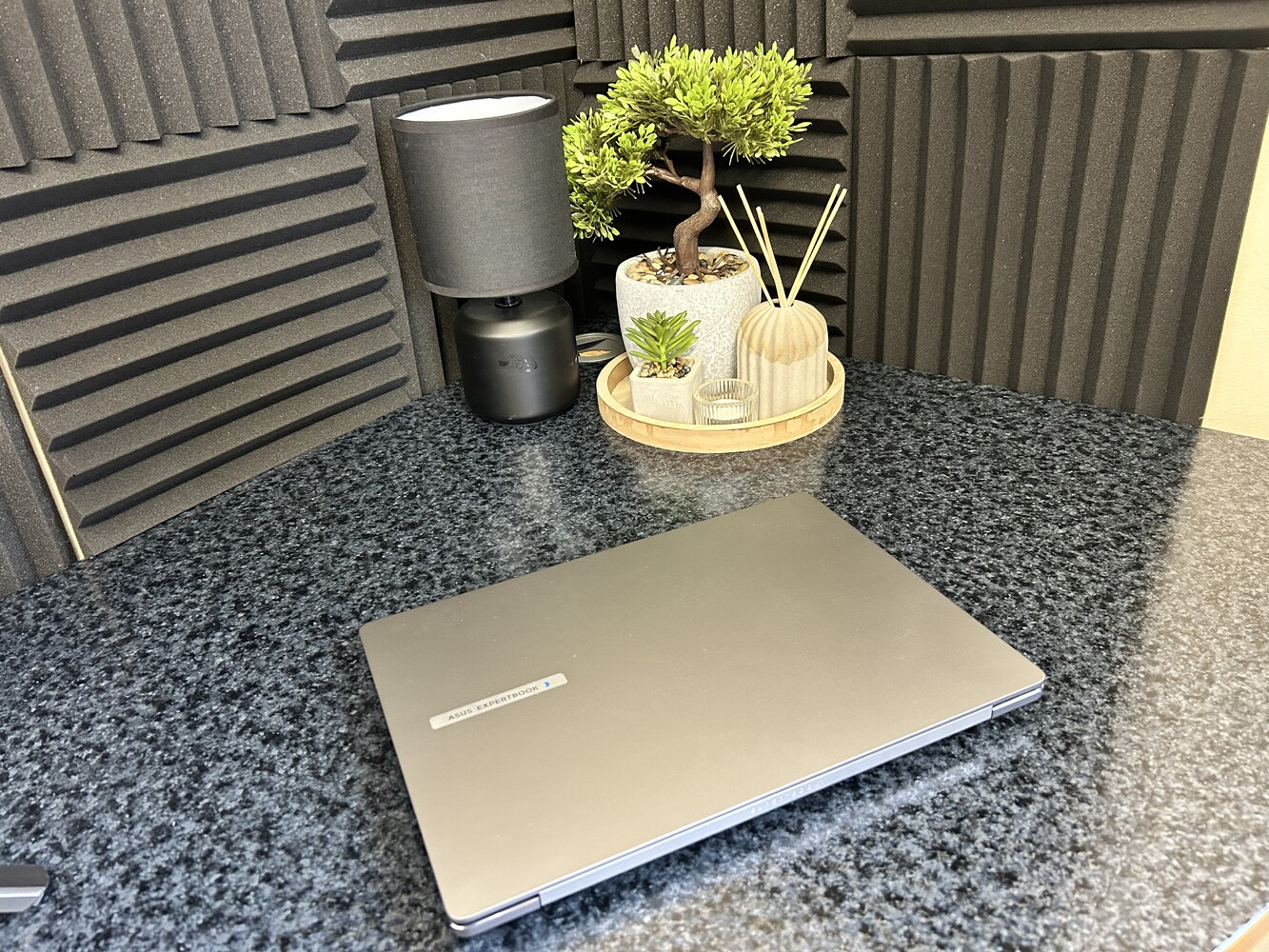
Copilot+ PCs intelligently distribute workloads between the available hardware on the device and Microsoft’s cloud servers to leverage the most powerful AI models.

As of August 10th 2026, Gemini in Google Classroom is now available for students of all ages.
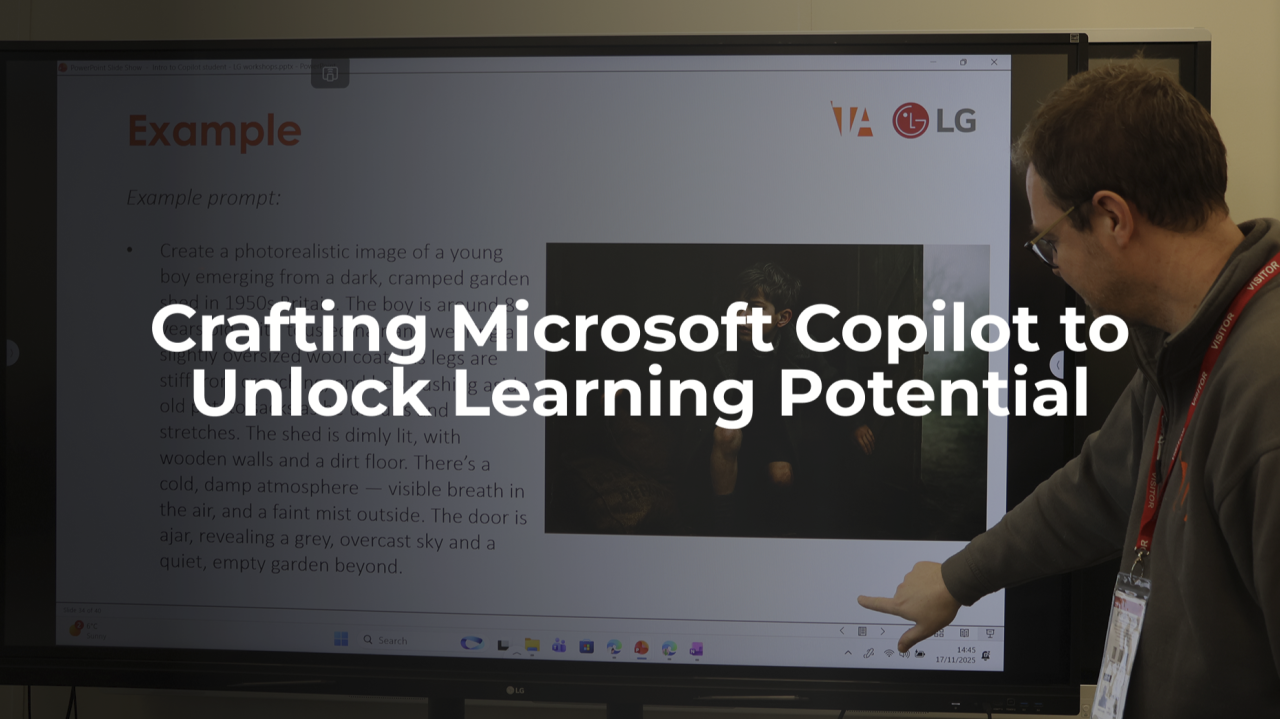
Understand AI from both ethical and practical perspectives, including the specific craft of prompt engineering.